How to Publish Your Free Profile on eleira.net
Eleira Studio guide · about 5 min
Your public profile is a free page for your business on eleira.net: photos of your work, a short bio, what you offer, and a button clients use to message you directly. Profiles are listed in the US decorator directory by state and show up on Google.
1. Open Public profile
Tap Public profile in the menu. First choose your page address — for example eleira.net/d/your-studio. In Settings, make sure your state is set: that's how clients in your state find you.
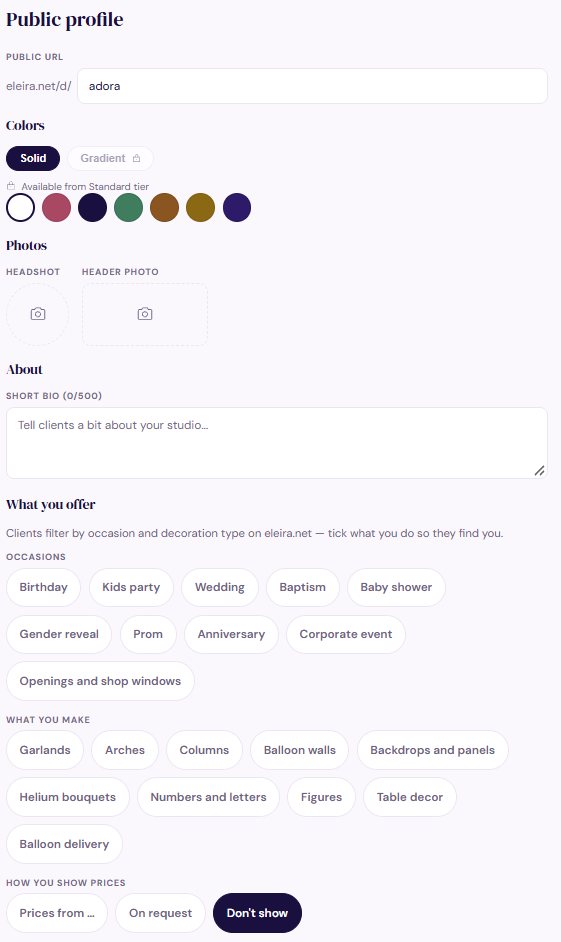
2. What to fill in
- Photos: a headshot (or your logo) and a header photo — your best design.
- About: 2–3 sentences — how long you've been decorating, where, and what makes you different.
- What you offer: tick your occasions (birthday, baby shower, wedding…) and what you make (garlands, arches, balloon walls…). Clients filter the directory by these.
- How you show prices: “Prices from …” with your lowest price, “On request”, or “Don't show”.
- Portfolio: add at least 3 photos of your work. Profiles with photos get far more inquiries.
- Contact and social links: Instagram, Facebook, TikTok, website.
3. Publish
Tap Publish at the bottom. Your page and your place in the directory go live right away. Use Preview to see it and Copy link to add it to your Instagram bio or Facebook page. To take it down, tap Unpublish.
When a client messages you from your profile, the inquiry arrives in Direct inquiries in Studio and in your email.
Your Logo and the Look of Your Quotes
How to upload your logo so it appears on your quotes, and how to choose the colors and header photo of your quotes.
Can't find an answer? Email us at [email protected] — Nadezhda replies personally. · All guides